Continuous improvement
Continuous Improvement Board: 8 Idea Examples and a 5-Step Setup
A filled-in board with eight workshop and office ideas, five setup steps and a phone-to-board test you can run right now.
Published by the makers of IdeaKanban. See sources and how this guide was prepared.

Many continuous improvement boards start with energy and go quiet within weeks. Cards pile up in "New", nobody knows who owns what, and people stop adding ideas. The fix is simple. A continuous improvement board works when every card shows a next action: who reviews it, which team takes it on and what you check after the change.
Below you get a filled-in board with eight continuous improvement ideas, four from production and four from office work. You also get a five-step setup, a printable PDF and a quick test you can run right now: send an idea from your phone to the free live demo board and watch it arrive.
A filled-in continuous improvement board with 8 examples
An idea about a gauge shelf and an idea about a customer form look very different. On the board, they need the same three things: context, a decision and someone who takes the next step. Here are both kinds side by side.
Filled-in example · 4 production + 4 office ideas
One board. Workshop and office improvements.
Two ideas in each stage. Click a card to see the problem, the proposed change and the next action.
New2
Approved2
In Progress2
Done2
On a narrow screen, scroll sideways to see all four stages.
Click any card to jump to its details below. When you build your own board, start with a situation your team recognises. Keep the proposed change small enough to test next week.
Eight continuous improvement ideas, stage by stage
Each stage asks a different question. New ideas need a review. Approved ideas need a handover. In Progress ideas need an update. Done ideas need a result people can understand. Here is what that looks like for all eight cards.
Production · New
1. Mark a home for shared gauges
- Observed problem
- The shared bore gauge ends up on a different bench most shifts.
- Proposed change
- Mark one storage spot beside Station 2 and agree that the gauge always goes back there.
- Next action · Production
- Ask operators where they use the gauge most and check the spot with them.
- What to check
- Can the next operator find and return the gauge without asking around?
Office · New
2. Keep one link to the current customer form
- Observed problem
- Colleagues keep their own copies of the customer form and ask which one is current.
- Proposed change
- Publish one link in the shared folder, give the form an owner and delete old shortcuts.
- Next action · Administration
- Confirm who owns the form and list the links that point to old versions.
- What to check
- Can a colleague find the current version from the shared link alone?
Production · Approved
3. Add a refill marker to a consumables bin
- Observed problem
- The cable-tie bin runs empty mid-job, and someone has to fetch stock.
- Proposed change
- Mark a minimum-level line inside the bin and agree who refills it when the line shows.
- Next action · Production
- Mark one bin this week and tell the team who refills it.
- What to check
- Does the bin get refilled before it runs empty?
Office · Approved
4. Use a three-line customer-case handover
- Observed problem
- When you take over an open case, you cannot see what happens next.
- Proposed change
- At every handover, write three lines: current status, next action and who is responsible.
- Next action · Customer service
- Agree the three lines and use them on the next ten handovers.
- What to check
- Can the colleague taking over continue without asking the customer again?
Production · In Progress
5. Show a correct packout at the station
- Observed problem
- The written packing instruction does not show where the protective insert goes.
- Proposed change
- Hang an approved photo of a correct packout next to the current instruction.
- Next action · Logistics
- Logistics checks the photo and tries it at one packing station for two weeks.
- What to check
- Do packers place the insert correctly without asking?
Office · In Progress
6. Put the decision needed on the meeting agenda
- Observed problem
- People come to the weekly meeting without knowing which decisions to prepare.
- Proposed change
- Add a decision-needed line and an owner to each decision item.
- Next action · Operations
- Use the new format for the next three team meetings and ask for feedback.
- What to check
- Does every decision item end with a recorded next action and owner?
Production · Done
7. Label the shared fixture shelf
- Observed problem
- Similar fixtures look alike and often go back to the wrong shelf position.
- Proposed change
- Give each shelf position a clear label that matches the fixture number.
- Next action · Production
- The labels are installed and the first use check is recorded. Production rewords a label if someone reports confusion.
- Check and result
- Result: in a one-week check, operators returned every fixture to the right place. One unclear label was reworded before closing.
Office · Done
8. Publish a supplier invoice reference guide
- Observed problem
- Colleagues keep asking which internal reference Finance needs.
- Proposed change
- Write a one-page guide with one example and a named Finance contact.
- Next action · Finance
- The guide is published and tested with users. Finance updates it when rules change.
- Check and result
- Result: colleagues used the guide on their next invoices. Finance had no follow-up questions.
Why the Done cards include a result: installing labels or publishing a guide is an action. It is not yet an improvement. Before you close a card, ask the people who use the change whether it helped, and write down what they said. Both Done examples show that final check.
Need more starting points? Our 25 employee suggestion box ideas pair concrete proposals with questions you can ask your team.
How to set up your continuous improvement board in 5 steps
1. Pick one team and one person who reviews
Start with a team whose work you can see, plus one person with time to review ideas. Agree what belongs on the board: improvements to everyday tasks, quality checks, handovers or shared information.
Then put the first review date in the calendar. A board without a review routine quickly becomes one more list someone has to chase.
2. Give each column a decision
IdeaKanban uses New, Approved, In Progress and Done as its four main stages, plus Discarded for ideas you won't pursue. Agree what each move means for your team:
- New: a suggestion has arrived and needs a review.
- Approved: you have decided to go ahead. It now needs an owner and a next action.
- In Progress: the responsible team is assessing or trying the change.
- Done: the change is complete and the result is recorded.
Also agree how you handle duplicates, unclear ideas and declined ones. An idea that won't go ahead still deserves a reason.
Columns track work. They don't tell you whether a change worked. ASQ's Plan-Do-Check-Act guidance describes the full cycle: plan a change, try it, check what happened and act on what you learned. Build that check into your routine before you count a moved card as a success.
3. Put the essentials on every card
When someone submits, ask for a clear title, the problem and the proposed change. Add a photo if it helps. The free employee suggestion form gives you a printable starting point and a filled-in example.
During the review, add the responsible team, the next action and when you expect an update. Once the change is done, add the result. Don't ask employees to calculate a return on investment before they can share what they have seen.
4. Make submitting easy where people work
Put the way in where the work happens. A QR code on a poster at the packing station or in the break room takes people straight to a form in their phone browser. Before launch, test it on the actual poster with an ordinary phone.
The Lean Enterprise Institute's definition of visual management is about making the status of work clear at a glance. For your board, that means anyone can see what needs a review and what happens next, without asking you to explain every card.
5. Review regularly and close the loop
Pick a review rhythm you can keep, for example 20 minutes every Tuesday. Look at new suggestions first, then at active ideas without a next action. Ask the responsible team about stuck items. Don't move cards just to make the board look busy.
When a change has been tried, ask the people using it whether it helped. Record a short result with the idea and tell the person who suggested it. For a wider rollout, our seven-step implementation guide covers roles, a pilot and useful measures.
Kaizen board, idea board or digital board: which do you need?
Teams use the names loosely. A kaizen board, an idea board and a continuous improvement board can all do the same job: collect ideas and show what happens to them. The format matters more than the name.
- A physical board on the wall works when one team works in one place and meets there, for example in a daily shift huddle. Someone has to keep the cards readable and up to date.
- A spreadsheet or shared list is quick to start for an office team. But photos and updates end up in separate emails, and colleagues without a company login often can't add anything.
- A digital board with QR submission fits when ideas come from several shifts or sites, or from people without a desk. Photos, updates and the decision stay with the idea.
Whatever you choose, test the whole route with the people involved: submit, review, hand over, update and give feedback.
Try it yourself: from your phone to the demo board
You can test the whole handover in the free public demo right now. No account, no email. All you need is a computer and a phone.
Your test idea lands in the New column of the demo board on your computer. The sample ideas in the other columns show what Approved, In Progress and Done look like in practice.
How the board works in IdeaKanban
IdeaKanban connects the QR code on your poster to your Idea Managers' board. Employees submit in their phone browser, add photos if they like and need no account. An Idea Manager reviews each idea and assigns approved ones to a department. That department gets an email with a secure link to add updates, photos and progress, also without an account.
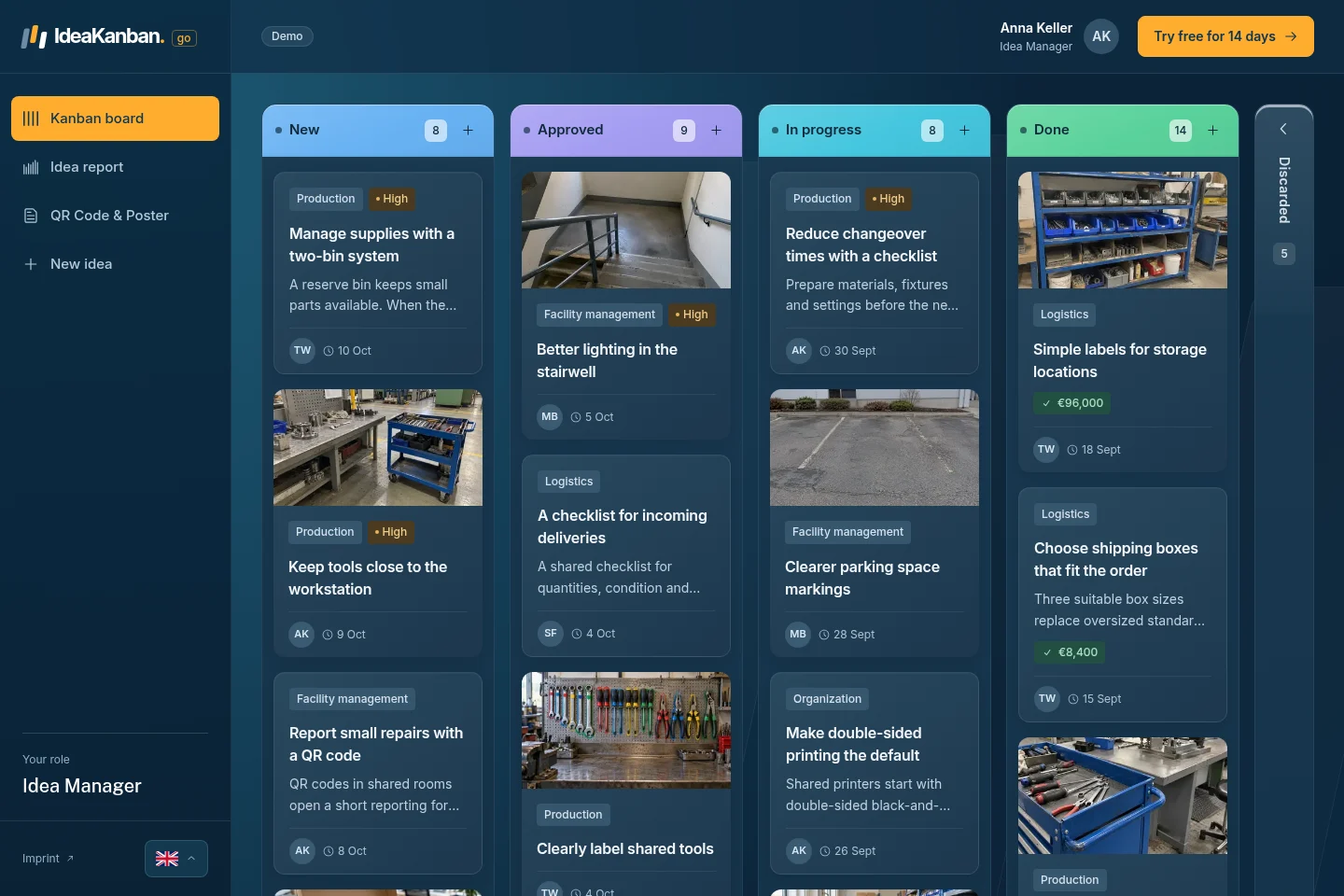
The real public demo board with sample names, ideas and values. Open it yourself at app.ideakanban.com/demo.
The idea report shows submitted and completed ideas plus recorded savings for the year to date. Plans start at €39/month, billed annually, with unlimited submitted ideas and no setup fee. The pricing page shows how many Idea Managers, departments and locations each plan includes. The public demo runs on sample data; the 30-day Business trial gives you a workspace for your own company.
Comparing tools? Use the six checks in our ideation management software guide. The small-business comparison covers named tools and their contribution requirements.
Continuous improvement board: common questions
What belongs on a continuous improvement board?
A practical problem, a proposed change and enough context to review it. Examples: clearer labels, smoother handovers, a better storage spot or one link to the current office form. During the review, add who is responsible and the next action.
Is a kaizen board the same thing?
Mostly, yes. Teams use the names interchangeably. A continuous improvement board supports everyday kaizen when it makes ideas and follow-through visible. Make sure your board records the result, not just the proposal.
Should we start with a physical or digital board?
Pick the one your team can reach and keep up to date. A physical board suits one work area. A digital board keeps submissions, photos and updates together across shifts and sites. Either way, test the full handover with the people involved.
Do employees need an IdeaKanban account to submit?
No. Employees use the QR code or link in their browser. Only Idea Managers log in to manage the board. Responsible departments get secure email links to update their assigned ideas.
What if an idea is declined?
Record the decision and a clear reason. Tell the person or team through your agreed feedback route. In IdeaKanban, declined ideas move to Discarded, so the decision stays visible. Keep enough context to explain it later, and agree how you handle duplicates and unclear ideas too.
Sources and approach
This guide is published by IdeaKanban. The filled board and the eight examples were created by the IdeaKanban team to show the process. The five setup steps are our practical recommendations. Sources checked on 13 November 2026:
- ASQ: Continuous improvement and Plan-Do-Check-Act.
- Lean Enterprise Institute: Visual management and Kaizen.
- IdeaKanban: workflow, plans and the public demo.
The product screenshot shows the real demo. The header image is an illustration.