Templates
Free Employee Suggestion Form Template (With a Filled-In Example)
Download the PDF or editable Word template, see a completed example and try the digital form in the free smartphone demo.
Published by the makers of IdeaKanban. See sources and how this guide was prepared.

Many suggestion forms fail for one of two reasons. They ask so much that nobody fills them in, or they ask so little that nobody can act on them. A good employee suggestion form sits in between: it takes two minutes to complete and gives the reviewer enough to decide what happens next.
Below you get a free one-page template (PDF and Word), a filled-in example and the five fields that matter. No email address required.
Download the free employee suggestion form template
Free downloads · no signup required
Free to use and adapt for your team. The paper template works on its own; it does not import suggestions into the app.
The top half is for the employee: title, problem, proposed change and optional context. The bottom half is for the person reviewing it: decision, responsible team, next action and outcome. Both halves stay on the same page, so the idea and what happened to it never get separated.
Sample employee suggestion form: finding the current customer form
Here is what a useful suggestion looks like in practice. The problem is small and familiar: colleagues keep different versions of a customer form and keep asking which one is current.
Filled-in example · office team
One link to the current customer form
A useful suggestion explains the problem, a possible change and how to check whether it helped.
- Work area / department
- Administration
- Suggestion title
- Keep one link to the current customer form
- What happens today?
- Colleagues keep different versions of the customer form and ask which file is current.
- What would you change?
- Publish one owner-managed link in the team's shared folder and replace old shortcuts.
- Expected benefit · optional
- Fewer 'which version?' questions. Ask the team after the first week whether the link is clear.
- Photo or reference · optional
- No photo needed. Location: the team's shared folder.
- Contact or feedback route · optional
- Left blank. Feedback goes out in the weekly team update.
Reviewer section: New · awaiting review. Next step: confirm who owns the form and check the existing links, then assign it to Administration.
Notice what makes it work. The title names the change, not just the topic. The problem is described in one or two sentences. The proposal is something a team could try next week. And it does not promise a saving nobody has measured yet. The same structure works for a shopfloor idea, such as a torque wrench that is never where you need it.
What should an employee suggestion form include?
Read the transcript
Most suggestion forms fail in one of two ways. They ask too much, or too little. A good form takes two minutes and asks for four things. A title that names the change. What happens today. What you would change. And optional context, like a photo. Keep the review separate: decision, responsible team, next action and outcome. That's the part people care about most. And skip mandatory cost estimates. They stop good ideas before anyone has looked at them. Paper works for a handful of ideas. Across shifts and sites, a QR code wins. Scan, type, add a photo, and the idea lands on a shared board. Get the free template in this article, or try the digital form in the live demo. No signup. IdeaKanban. From idea to done.
Pressing play loads the video from Vimeo. Privacy policy
1. A title that names the improvement
"Keep one link to the current customer form" tells the reviewer exactly what is being proposed. "Forms" does not. A clear title also makes the suggestion easy to find again three weeks later.
2. What happens today
Ask what the person sees and where. They do not need to know the root cause. "We keep asking which version is current" is enough to start a conversation.
3. What they would change
One concrete proposal the team can assess, refine or reject. It does not have to be the final solution.
4. Optional context
A photo, a location or a short note on why it matters. A picture of an overflowing packing station explains more than a paragraph. Keep these fields optional.
5. A separate section for the review
Date received, decision, responsible team, next action and outcome. This is the part most paper forms forget, and it is the part employees care about most: did anything happen?
What to leave out: mandatory cost calculations, sign-off boxes for the employee and long checklists. If a field does not help someone decide what to do next, delete it. If you ask for a name, say how you will give feedback. An optional name field on its own does not make a form anonymous.
Try the digital form on your smartphone
Paper works for a handful of ideas. Once ideas come from several shifts or sites, a QR code beats a form box: people scan it, type the idea, add a photo and it lands on a shared board. You can try exactly that in the free live demo. No signup, no email.
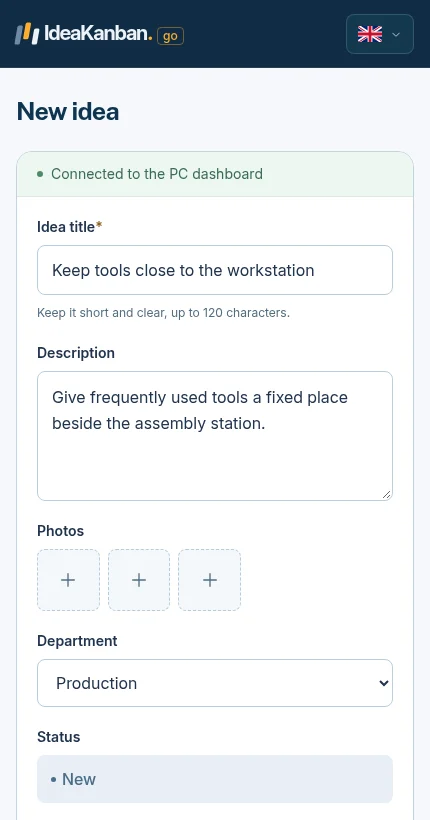
The real mobile form from the public demo: title, description and optional photos. Employees need no account.
What happens after someone submits the form?
This is where most suggestion schemes quietly die. The form gets filled in, goes into a box or an inbox and nobody hears anything. If people hear nothing for weeks, they stop suggesting.
Agree three things before you hand out the first form:
- Who reviews new suggestions, and who covers when they are away.
- How quickly employees get a first answer, even if it is only "received, we'll look at it on Tuesday".
- How the outcome is shared: approved and assigned, needs a question answered, or declined with a reason.
CIPD's guidance on employee voice makes the same point: listening only counts if management responds and acts. For ready-made wording, see our six response examples. For what to do with approved ideas, see the continuous improvement idea board with eight examples.
When is a paper form enough, and when should you use software?
Paper or Word is enough when one coordinator handles a few suggestions a month and can keep the review and feedback up to date by hand.
Software starts paying off when you notice any of these:
- Ideas arrive by email, chat, paper and in conversation, and nobody has the full list.
- Photos and updates are scattered across inboxes.
- Departments are asked to implement something but nobody sees whether they did.
- Employees ask "what happened to my idea?" and you have to go and find out.
IdeaKanban was built for exactly that step. Employees submit by QR code without an account, Idea Managers review on one board, and departments update their ideas through a secure email link. Plans start at €39/month, billed annually; see pricing for what each plan includes. If you are comparing tools, use our six software checks. If you are planning a rollout, start with the 7-step implementation guide.
Employee suggestion form questions
Is the employee suggestion form template really free?
Yes. The blank PDF, the editable Word file and the filled-in example are free to download and adapt. No registration, no email address.
What format should an employee suggestion form have?
One page with five fields is enough: a title that names the improvement, what happens today, what the person would change, optional context such as a photo, and a separate section for the review. People should be able to fill it in at their workstation in a few minutes. Print the PDF for a suggestion box, or use a phone form for teams without a desk.
Is there a sample employee suggestion form I can use?
Yes. The sample above shows a complete suggestion about finding the current customer form. You can download it as a PDF next to the blank template and the Word file.
Is the PDF editable?
The PDF is made for printing and filling in by hand. Use the Word file if you want to change the questions or layout.
Can employees submit from their phone without creating an account?
Yes. In IdeaKanban, employees scan your QR code or open a link and submit in their phone's browser. Only Idea Managers log in. You can try the employee view right now in the free demo.
Does the template import suggestions into IdeaKanban?
No. The template is a standalone paper and Word resource. If you later switch to software, plan how to carry over open suggestions.
Does a login-free form make suggestions anonymous?
Not automatically. No login means no account, but the text or a photo can still identify someone. Tell people honestly how suggestions are handled before you invite them.
Sources and approach
The template, the example and the field recommendations were created by the IdeaKanban team to show the process. Sources checked on 13 November 2026:
- CIPD: Employee voice, on management response and two-way communication.
- GOV.UK Design System: Question pages, on testing and simplifying form questions.
- IdeaKanban: how it works, FAQ, pricing and the public demo. The mobile screenshot shows the real public demo; the header image is an illustration.