Buying guides
Best Employee Suggestion Software for Small Businesses: 5 Options
Five tools compared by price, phone access, photo uploads and what happens after an idea is submitted.
Published by the makers of IdeaKanban. See sources and how this guide was prepared.
Your team has ideas. They come up at the packing station, in the break room and in the van between jobs. Most of them never reach anyone who can act on them. The right employee suggestion software fixes that, but only if it fits the job. An everyday workshop improvement, an anonymous HR concern and an occasional office idea need very different tools.
Below you get a shortlist of five options for a small business, what each one costs and the questions that decide between them. You can run the key checks yourself in our free live demo, no signup needed.
We make IdeaKanban, one of the five tools. Everything about the other four comes from their own public pages, checked on 15 November 2026. The links are in the sources at the end.
The shortlist: 5 employee suggestion software options for small businesses
Start with the job you need done. IdeaKanban, HYPE Boards and Suggestion Ox are dedicated tools with their own workflow. Microsoft Forms and Google Forms collect the suggestion, and you connect them to a process of your own.
| Tool & best fit | Entry cost | What to check |
|---|---|---|
| Our pick for everyday improvementsIdeaKanbanQR submissions and a focused improvement board | €39/monthBilled annually. 30-day Business trial. | Starter: 1 Idea Manager, 3 departments, 1 board. Unlimited submitted ideas. Employees submit without an account. |
| HYPE BoardsConfigurable innovation processes and idea evaluation | Basic: $79/monthBilled annually; VAT extra where applicable. Ten users and two boards. | Count the users and workflows you need. Pro, aimed at SMEs, adds more capabilities. Confirm the currency and price for extra users. |
| Suggestion OxAnonymous employee feedback and private follow-up | Custom organisation quoteMonthly or annual billing. Free pilot advertised. | Built for confidential conversations: two-way anonymous replies and case management. Ask for a quote that covers your rollout. |
| Microsoft FormsBasic intake in an existing Microsoft environment | Depends on your account or subscriptionCheck availability and limits in your current plan. | QR sharing and responses without sign-in work. File-upload questions need organisation-only responses. You build the follow-up yourself. |
| Google FormsA simple suggestion form with a separate tracker | Google Account or WorkspaceCheck your organisation’s account and plan requirements. | Fine for a small intake process. File uploads require a Google Account sign-in. You decide how to track decisions and owners. |
Already have a working review process and only lack a form? Then your existing Microsoft or Google tools may be enough. A per-organisation price, a user-based plan and an existing office subscription are three different ways to buy. Confirm what each price covers before you compare totals.
Not sure yet which type of tool you need: a brainstorming canvas, a form or an improvement workflow? Our ideation management software guide maps the tool types and gives you six hands-on demo checks.
How to choose employee suggestion software: 5 questions
We compared published features, access rules and pricing terms. Our pick reflects what IdeaKanban is built for: practical employee suggestions in small and medium-sized companies. These five questions make the differences visible fast:
- Can employees submit where they work? Open the link on a phone. Does it ask for an account, a work email or an app?
- Can they show the problem? A photo of excess packaging or a badly placed tool says more than a paragraph. Check the sign-in rules for photo uploads separately from text answers. In Microsoft Forms and Google Forms, file uploads have their own sign-in rules.
- Who acts on the suggestion? Look for a visible decision, a responsible person or department, and a place to record progress.
- What will you pay for? Count managers, contributors, boards and locations the way each vendor licenses them.
- Who should see what? A shared improvement board and a private HR channel need different visibility and follow-up rules.
Want to test questions 1 and 2 with a real form? Our free employee suggestion form template includes a filled-in example and a route from your phone into the public demo.

One idea, from start to finish
Test the whole suggestion journey
- Share an idea
Submit from a phone with a photo of the problem.
- Give it an owner
Record the decision and assign a department.
- See what changes
Keep status and next step on the original idea.
IdeaKanban: for everyday improvements that need follow-through
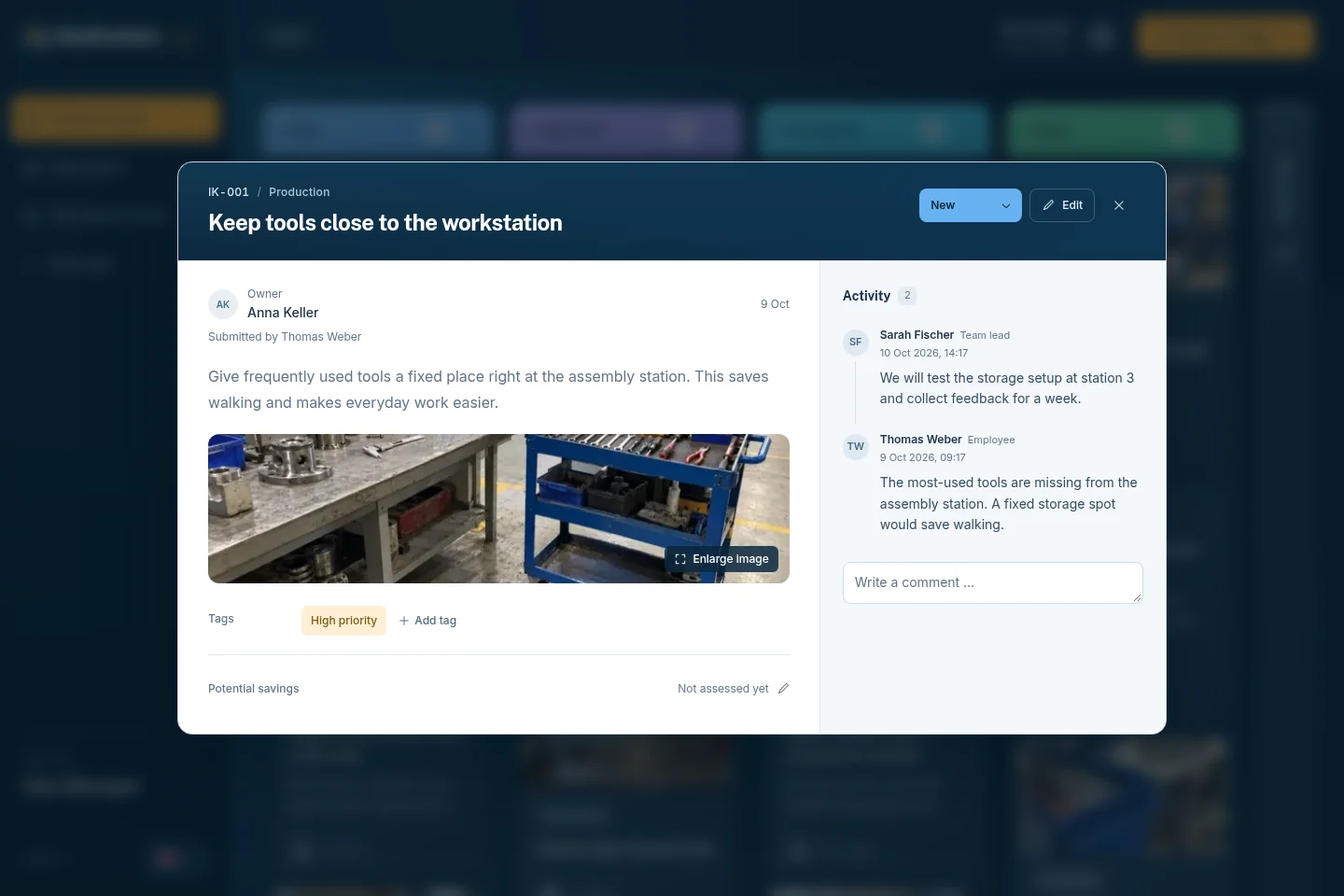
Picture this. An operator notices the packing station keeps running out of tape. She scans the QR code on the wall, types two sentences and adds a photo. No account, no app. You see the idea in the New column on your board, approve it and assign it to Logistics. Logistics gets an email with a secure link and adds an update with a photo of the new tape holder. The only person who logged in was you.
Shortlist IdeaKanban when that is your job: employees report improvements from their phone, and a coordinator hands them to a department. Idea Managers review on a Kanban board that runs from New to Approved, In Progress and Done. The idea report shows submitted and completed ideas and recorded savings for the year to date.
Read the transcript
Your team sees what could work better. Every single day. A tool that's always out of reach. A queue at the label printer. A risky shortcut through the warehouse. But most of these ideas end up on a sticky note, in an email or in a spreadsheet. And then they're gone. That's expensive. On average, one implemented idea is worth more than seventeen hundred euros. Top companies save up to nine hundred and fifty euros per employee, every year. For a team of a hundred, that's up to ninety-five thousand euros. IdeaKanban turns those ideas into real improvements. Built for small and medium-sized companies. Hang your QR code where the work happens. Employees scan it, describe their idea and add a photo. No app, no account, no password. Every idea lands on one clear board. New. Approved. In progress. Done. Approve an idea and assign a department. They get an email with a secure link and post their updates right on the idea. No extra logins. You always see what's moving, what's done, and how much your team has saved. Unlimited ideas. No licences per employee. No setup fees. Hosting in the region you choose. All from thirty-nine euros a month. That means one implemented idea can pay for more than three years of our Starter plan. See it for yourself. Open the live demo, scan the QR code with your phone, and watch your idea land on the board. No signup needed. IdeaKanban. From idea to done.
Figures in the video: Ideenmanagement-Studie 2023 (N. Landmann, Prof. H.-D. Schat).
Pressing play loads the video from Vimeo. Privacy policy
Budget check: Starter is €39/month, billed annually for one Idea Manager, up to three departments and one board. Submitted ideas are unlimited, and there is no setup fee. Does your coordinator work with six departments? Then Starter is too small. Compare the current plans.
Where it is not the right fit: a login-free form does not make case handling anonymous. If you need anonymous two-way replies, a specific identity integration or specialised evaluation methods, check that requirement directly. Don't assume the board covers it.
Want to look around first? The free live demo opens a sample board with no signup. The 30-day Business trial gives you your own board for your departments and inboxes.
HYPE Boards: for configurable innovation processes
Look at HYPE Boards when your suggestion programme needs configurable processes and idea evaluation. Its published plans list Kanban, list and bubble views, evaluations, commenting and other participation features. Pro adds custom fields, workflow automations and integrations.
- Basic: $79/month, billed annually, with ten users and two boards. VAT is extra where applicable.
- Pro: positioned for SMEs, with 100 users and up to 15 boards. Pricing is available on request.
- Watch the currency: the page shows a different currency for Basic's additional-user charge. Confirm the currency and total for your rollout with HYPE.
HYPE Boards is a good option if you want to shape more of the innovation process yourself and will actually use those features. Match the user capacity and plan features to your real programme. HYPE Boards belongs to the HYPE portfolio. Our HYPE alternatives guide for smaller companies explains how Boards differs from HYPE Idea Management.
Suggestion Ox: for anonymous feedback and private follow-up
Some things employees won't say with their name attached. Suggestion Ox focuses on exactly that kind of feedback. Its product page describes two-way anonymous replies, private case management, assignment and resolution. That makes it the right comparison when you need a confidential exchange with an employee, not a shared view of workplace improvements.
Its pricing page offers a custom per-organisation quote after a short conversation, based on team size and rollout scope. It advertises monthly or annual billing and a free pilot. Budget from a current quote, not from older published plan prices.
Choose it if anonymous feedback and follow-up is the job you need done. In your evaluation, ask how administrators handle visibility, ownership and replies. For an improvement programme, also ask how the people making a change record their progress.
Microsoft Forms: for intake in a Microsoft environment
Already working with Microsoft tools, and someone is willing to run the review process? Then Microsoft Forms is a sensible place to start. You can share a form by QR code. The Anyone can respond setting accepts answers without sign-in, according to Microsoft's sharing documentation.
The catch for shopfloor use is photos. Microsoft says file-upload questions require the Only people in my organization or Specific people in my organization response settings. So a text form that works without sign-in doesn't mean your operators can upload a photo the same way.
Check availability and response limits for your account or Microsoft 365 subscription. Then decide how a suggestion travels from the form to a reviewer, an owner and an implementation record. You can build that with Microsoft tools and automation. The setup and its upkeep then become part of your solution.
Choose Forms when basic intake plus your existing follow-up is enough. Before you print QR posters, test the full submission, photo included, with a real operator's access.
Google Forms: for a simple form and a separate tracker
Google Forms suits a team that is happy to organise the steps around it. You collect a short title, a description and any other details. Then you record decisions, owners and progress in a tracker of your choice. Check your organisation's Google Account or Workspace requirements first.
Watch the responder settings. Limiting a form to one response, for example, requires respondents to sign in to a Google Account. Google's question-type documentation also says file uploads require a Google Account sign-in.
With a modest number of suggestions and a coordinator who reviews them consistently, a form works. The real question is where the work lives afterwards. Who records the approval? Who tells the responsible team? Where does anyone find the latest update? Add-ons or custom automation can extend a form, so count the effort to maintain them.
Pick this route if your team is comfortable running that process. Move to a dedicated suggestion board once copying responses and chasing updates become routine chores.
What it really costs: a 50-person company
Headcount tells you surprisingly little. Take a company with 50 employees. It may have just one person coordinating ideas. It may also have six departments, two locations or several people who manage the whole board. Those details decide the price.
Here is how that plays out:
- IdeaKanban: one coordinator, one board and up to three departments fit Starter. Six departments need Business, which covers unlimited departments and up to five Idea Managers. Two locations point to Multi-Site. The 50 employees who submit need no licence.
- HYPE Boards: each plan includes a user allowance. Count the people who need a HYPE user against it.
- Suggestion Ox: quotes for the organisation and the rollout.
- Microsoft or Google Forms: the cost depends on your account or subscription, plus the workflow you build around the form.
Before you approve a budget, write down:
- Who submits ideas, who manages the board and who updates assigned work.
- The departments, boards and locations you need now.
- Any required photo uploads, integrations or access controls.
- Subscription costs, billing commitments and the time it takes to run the process.
Keep currencies separate when you compare prices. A monthly price billed annually also comes with different payment terms than a rolling monthly subscription. Ask for those terms along with the feature list.
Three small-business situations and what to shortlist
Before you book a single sales demo, write a one-page brief. Start from the situation closest to yours.
1. A workshop where operators have no company accounts
Your operators use their own phones and nobody on the shopfloor has a work email. Write down the device they will use, whether photos are required and who owns implementation. A text form that passes the access test isn't enough if the photo step then needs a login they don't have. Shortlist only the tools that pass both checks. Re-read the Forms restrictions above before you print QR posters.
2. An HR team collecting sensitive feedback
You want people to raise concerns they wouldn't say out loud. Decide whether you need an anonymous two-way exchange and who may see or handle each case. Don't assume a general improvement board covers that. Review Suggestion Ox's documented model and confirm the access and privacy arrangements for your rollout.
3. An office testing whether colleagues will use a suggestion scheme
You expect a few ideas a month, and one coordinator can keep a tracker up to date. Your existing form tool may be enough. Give that person a clear job: review, record a decision, notify the owner and send feedback. Revisit the setup once those tasks start slipping.
For each tool on your shortlist, note four things: the essential requirement, the evidence you asked for, the capacity quoted and the open question. Then run the six hands-on software checks with the printable worksheet. You can try all six in our free live demo today. Once you have chosen, the implementation guide walks you through the rollout.
Employee suggestion software: common questions
Which employee suggestion software suits a small manufacturing company?
For everyday improvements, we recommend IdeaKanban when QR submission, optional photos, department responsibility and a clear Kanban board fit your needs. Compare HYPE Boards if you need more configurable innovation processes, or Suggestion Ox if anonymous conversations come first. Your operators' account access and the people managing ideas should drive the choice.
What is a good employee suggestion tool for a company that isn't enterprise scale yet?
Choose a tool your team can start without a rollout project. Three checks matter most: employees submit from their phone without a company account, one person or a small group decides on a single board, and the department that implements an idea can update it without a licence. IdeaKanban is built for exactly that, from €39/month, billed annually. If you need configurable evaluation stages, compare HYPE Boards. Enterprise innovation suites usually work with quotes and an implementation project, which suits companies that run innovation campaigns across many sites.
What are the pros and cons of an employee suggestion scheme?
The pros: problems surface from the people who see them every day, many small improvements add up, and people who get an answer keep suggesting. The Ideenmanagement-Studie 2023 puts the average benefit at €1,728 per implemented idea. The cons: every idea needs a review and a reply, which takes time. A scheme without feedback even backfires, because unanswered ideas stop the next one. Cash rewards can also start debates about what an idea was worth. So plan a fixed weekly review and a reply for every idea before you launch.
Can we use Microsoft Forms or Google Forms as suggestion box software?
Yes. Both can collect suggestions. You then decide how to record decisions, assign work and follow progress around the form. Check the responder settings and photo-upload rules before you assume the form works for every employee.
Do all 50 employees need a paid suggestion-software account?
It depends on the vendor's licence model and the roles each person has. In IdeaKanban, employees submit ideas without an account or a paid licence. Plans differ by Idea Managers, departments, boards and locations. Other products use their own user allowances or organisation quotes.
Can employees attach photos without creating an account?
In IdeaKanban, yes: employees add optional photos in the browser form without creating an account. Google Forms requires a Google Account sign-in for file uploads. Microsoft Forms limits file-upload questions to organisation-based response settings. Test this with the people who will actually submit.
Is IdeaKanban free?
You get a free 30-day Business trial, followed by paid plans from €39/month, billed annually. The public live demo with sample data is free too, and you can open it right now without signing up. The trial creates your own company board; the demo lets you explore the interface.
Sources and approach
IdeaKanban publishes this guide and is one of the five options. We checked product details, plan terms and access requirements against the sources below on 15 November 2026. Offers and features change, so confirm them before you buy. We assessed the other vendors from their official documentation, not in hands-on trials. The IdeaKanban screenshots and recording show the public demo with sample names, ideas and amounts.
- IdeaKanban: plans, submission and review workflow, getting started and public demo.
- HYPE Boards: plans, user allowances and feature comparison.
- Suggestion Ox: product and follow-up workflow and organisation pricing and pilot.
- Microsoft Forms: sharing and sign-in settings and file-upload restrictions.
- Google Forms: product overview, response settings and file-upload question requirements.
The other product names belong to their respective providers. This guide is not affiliated with or endorsed by those providers.